
Claude Skills vs MCP: Token Efficiency Explained
If you’ve spent time building with large language models, you’ve likely experienced the frustration of repetitive prompting. Crafting a perfect prompt only to start over days later feels like running a hamster wheel. This is where Claude Skills step in — a game-changer for AI-powered workflows.
What Are Claude Skills?
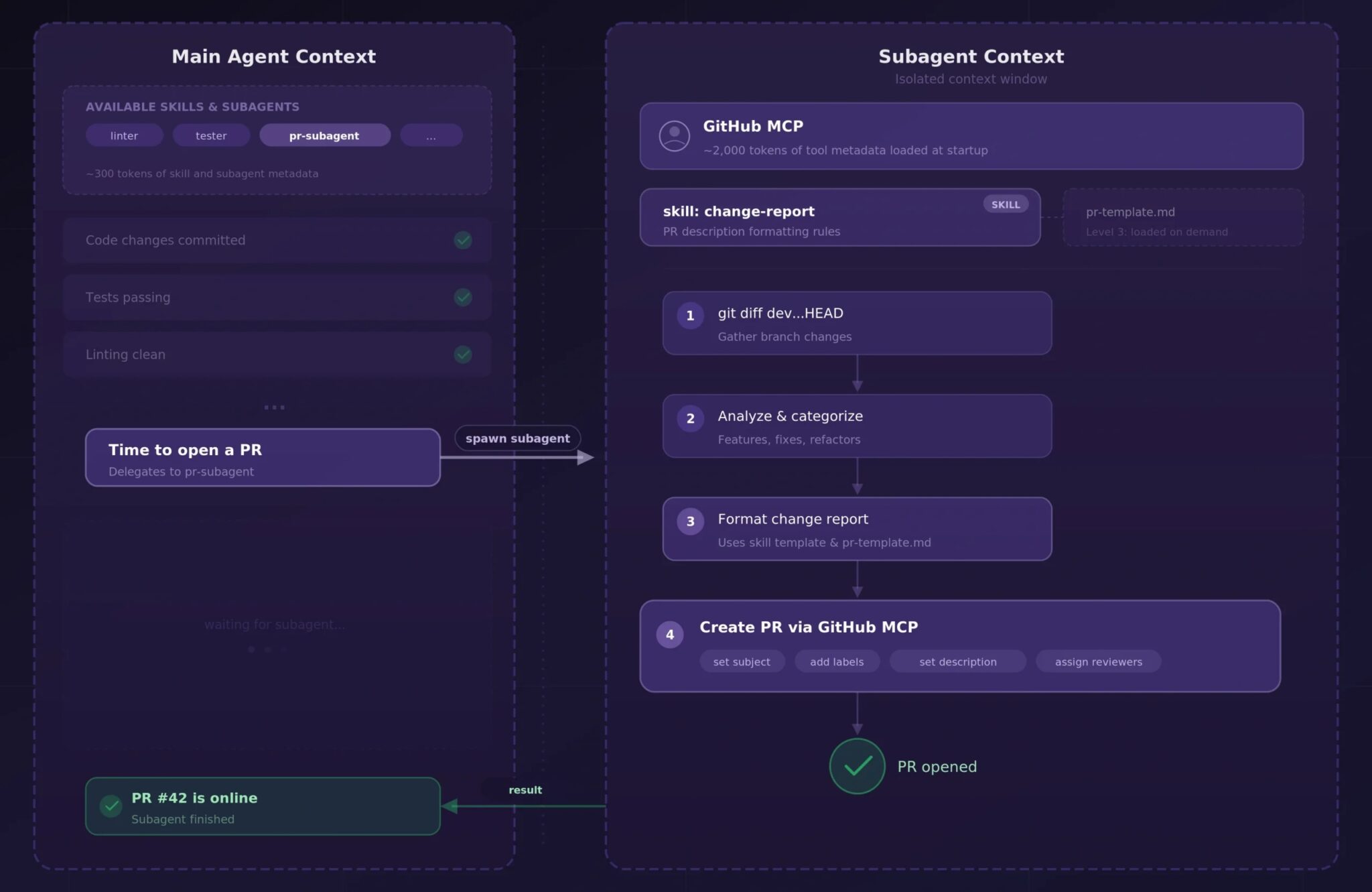
Claude Skills are reusable instruction sets designed to streamline AI interactions. Unlike traditional tools like MCP (Model Context Providers), Skills use a lazy-loading approach. Here’s how they work:
- Metadata: Name and description (loaded at startup)
- Skill Body: Detailed instructions (loaded only when relevant)
- Referenced Files: Additional context (loaded on demand)
This progressive disclosure minimizes upfront token costs while maintaining flexibility.
Token Economics: Skills vs MCP
The Cost Problem with MCP
MCPs load all tool metadata upfront, regardless of relevance. For example:
- AWS tools: ~8,500 tokens
- GitHub metadata: ~2,000 tokens
- Sentry: ~12,500 tokens
This totals ~32,000 tokens per message — a costly overhead. At $5 per million input tokens, even a simple 5-message conversation adds $0.80 in pure overhead.
Skills’ Cost Efficiency
Skills flip this model:
- Metadata only: ~100 tokens per skill
- Full body loaded only when needed (~5,000 tokens)
- Referenced files loaded on demand
In practice, most conversations only invoke 1-2 skills. This means costs scale with actual usage, not the number of registered tools.
Why Skills Matter for Developers
Skills address three critical pain points:
- Cost: Reduce idle metadata overhead
- Latency: Faster responses with shorter context windows
- Quality: Cleaner outputs by avoiding irrelevant context
For developers juggling 50+ messages daily, this translates to significant savings. At $0.16 per message, Skills can cut monthly overhead from $160 to pennies.
Getting Started with Skills
To implement Skills:
- Create a
skill.mdfile with name, description, and instructions - Place it in
.claude/skills/directory - Let Claude auto-detect and load context as needed
This approach works best for tasks requiring modular workflows — code generation, documentation, or project management.
Conclusion: Skills vs MCP
Claude Skills aren’t just better MCPs — they’re a fundamentally different approach to context management. By loading context only when needed, they solve the token economics problem while maintaining flexibility. For developers, this means faster, cheaper, and higher-quality AI interactions.
Try Skills today and break free from the prompt engineering hamster wheel. Your token budget will thank you.
FAQs
1. How do Claude Skills reduce token costs?
Skills use lazy-loading: metadata loads first, full instructions only when needed. This cuts upfront token usage by 90% compared to MCPs.
2. Can Skills work with existing tools?
Absolutely. Skills integrate with AWS, GitHub, and other platforms while optimizing context management.
3. Are Skills limited to technical workflows?
No. They work for documentation, project management, and creative tasks — any scenario needing modular context.
4. How do Skills handle complex tasks?
Through progressive disclosure: Skills load referenced files only when steps require them, maintaining efficiency.
5. What’s the learning curve for Skills?
Minimal. Create skill.md files and let Claude manage context automatically. No need to rewrite existing prompts.








