
Cloudflare Custom Regions: Fine-Grained Data Control
What Are Cloudflare Custom Regions?
Cloudflare recently launched Custom Regions, a powerful new feature that gives developers and enterprises precise control over where their data is processed. By defining custom geographic boundaries, users can ensure TLS termination and application-layer processing stay within specific regions, meeting compliance needs and optimizing performance.
Why This Matters
Data residency requirements are no longer optional. From GDPR in Europe to regional data sovereignty laws, businesses must prove they can isolate sensitive data within legal boundaries. Cloudflare’s solution lets you create regions based on any combination of countries, including edge cases like “countries using Fahrenheit” or “excluding North America.”
How Custom Regions Work
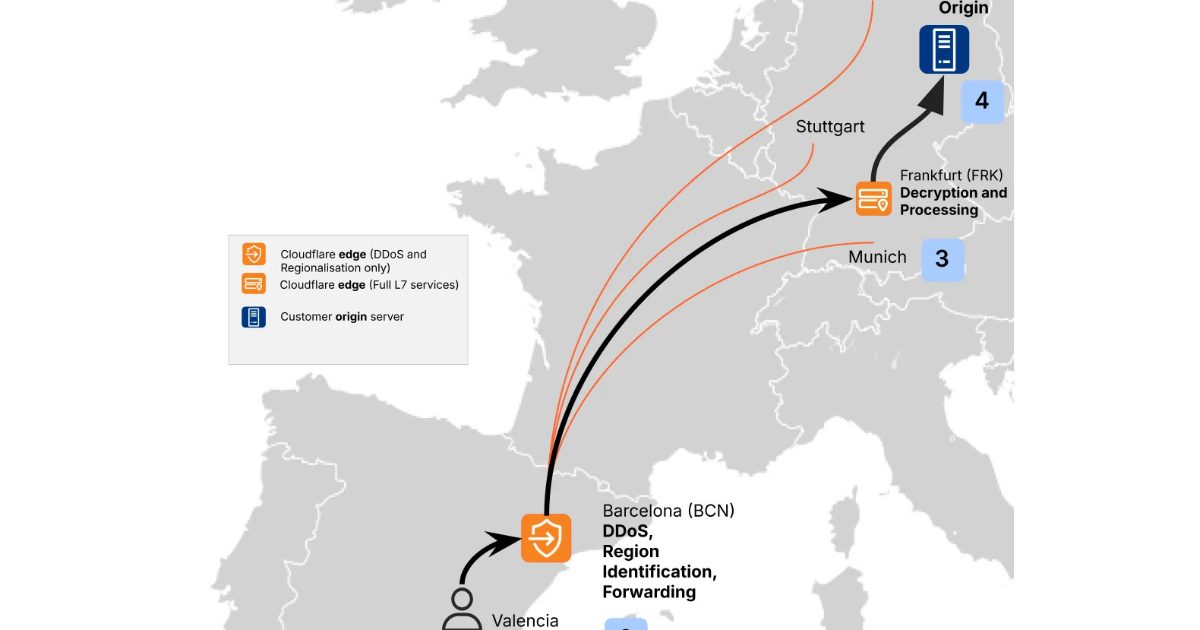
Cloudflare’s approach differs from traditional cloud providers like AWS or Azure. Instead of fixed regions, it uses a global edge network but enforces regional rules at the edge. Here’s the process:
- Define Region Membership: Use expressions like `country_code == “TR”` or `!(country_code in [“US”, “CA”, “MX”])` to build custom groups.
- Select In-Region Destination: Cloudflare picks the optimal data center based on real-time metrics like network health and capacity.
- Enforce Boundaries: Traffic is either processed locally or rerouted to the chosen region, ensuring compliance.
Real-World Use Cases
– Compliance-Driven Workloads: Meet strict data residency laws in healthcare, finance, or government sectors.
– Latency Optimization: Serve users in specific regions faster by processing data closer to them.
– Exclusion Zones: Avoid regions with unstable infrastructure or regulatory risks.
Key Benefits for Developers
- Flexibility: Create regions based on any geographic criteria, not just pre-defined zones.
- Performance: Reduce latency by routing traffic to the nearest compliant data center.
- Compliance: Turn policy requirements into enforceable technical controls.
Implementation Example
A European bank might define a region including Germany, France, and the Netherlands (`country_code in [“DE”, “FR”, “NL”]`) to comply with EU data laws. Meanwhile, a U.S.-based SaaS provider could exclude all EU countries to avoid GDPR obligations for non-EU customers.
Getting Started with Custom Regions
While the feature isn’t self-serve yet, Cloudflare recommends contacting your account team to configure regions. The setup involves:
1. Defining Membership Rules: Use Cloudflare’s expression language to specify inclusion/exclusion criteria.
2. Testing Performance: Validate latency and compliance using Cloudflare’s metrics dashboard.
3. Enforcing Policies: Lock in configurations to prevent accidental data leakage.
Why This Matters for Your Business
As R5 Inteligência Digital notes, “Fine-grained regional boundaries are becoming a board-level requirement.” Custom Regions let you:
– Future-Proof Compliance: Adapt to evolving regulations without overhauling infrastructure.
– Reduce Risk: Avoid data breaches caused by misconfigured global settings.
– Improve User Experience: Deliver faster, localized performance to global users.
Conclusion
Cloudflare’s Custom Regions solve a critical problem for modern developers: balancing global scalability with regional control. By turning abstract compliance policies into technical rules, this feature empowers teams to build secure, high-performance applications. Contact your Cloudflare account team today to start defining your custom regions and take control of your data’s journey.
Stay ahead of the curve with expert insights on cloud infrastructure and compliance. Follow InfoQ for more updates.








