
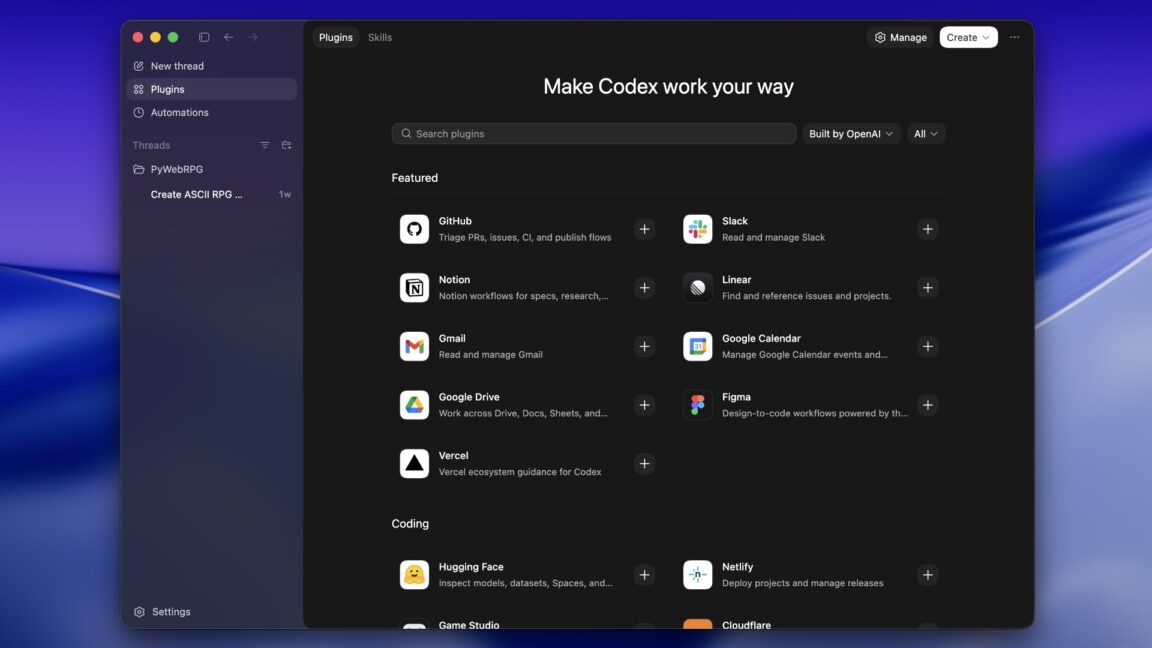
OpenAI’s Codex Plugins: Bridging the Gap in AI Coding
OpenAI has just shaken up the AI coding landscape with its latest update to Codex. By introducing plugin support, the company is directly addressing a feature gap that competitors like Anthropic and Google have already capitalized on. This move positions Codex as a more versatile tool for developers, but how does it stack up against existing solutions? Let’s break down what this means for the future of AI-powered coding.
What Are Codex Plugins?
Codex plugins are modular extensions that combine three core components:
- Skills: Predefined workflows that streamline repetitive coding tasks
- App Integrations: Direct connections to platforms like GitHub, Gmail, and Cloudflare
- MCP Servers: Custom model context configurations for specialized workflows
These plugins simplify complex configurations that power users previously handled manually. The new Plugins section in Codex offers a searchable library with one-click installation, making it easier for teams to standardize workflows across projects.
Key Benefits for Developers
The plugin system delivers three major advantages:
- Time Savings: Reduce setup time for common tasks like code reviews or deployment pipelines
- Consistency: Ensure uniform coding standards across team projects
- Scalability: Replicate successful workflows across multiple projects
Competing in the AI Coding Arms Race
While OpenAI is late to the plugin party, the feature mirrors Claude Code’s approach and aligns with Google’s Gemini CLI. This strategic move comes as developers increasingly demand:
- Seamless integration with existing tools
- Customizable AI behavior for specific use cases
- Enhanced security for enterprise environments
Early data shows Codex adoption is growing, but Anthropic’s Claude Code still holds a 40% market share among developers. OpenAI’s challenge now is to differentiate Codex through unique plugin capabilities.
Getting Started with Codex Plugins
Developers can explore plugins directly in the Codex app or via CLI with these steps:
- Open the Plugins section in Codex
- Search for relevant plugins (GitHub, Gmail, etc.)
- Install and configure using the guided setup
- Test workflows with the built-in sandbox environment
OpenAI’s documentation provides detailed guidance for both casual users and enterprise teams looking to create custom plugins.
Looking Ahead
As the plugin ecosystem matures, we can expect:
- More specialized plugins for niche development needs
- Improved collaboration features for team workflows
- Enhanced security protocols for enterprise adoption
For developers, the key takeaway is clear: Codex’s plugin system represents a significant step forward in making AI coding tools more practical and powerful. While it may not yet surpass competitors, it offers a compelling alternative for teams seeking flexibility and customization.
Ready to test Codex plugins? Start exploring the plugin library today and see how these tools can transform your development workflow.








