
Introduction to Qt Creator 19
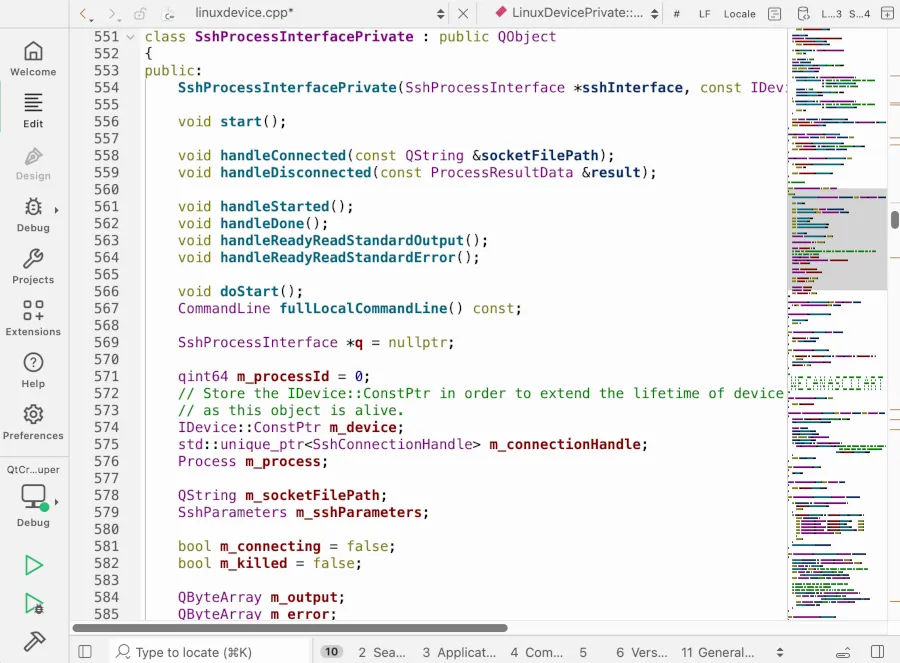
Qt Creator 19, the latest version of the cross-platform integrated development environment (IDE), has been released. This new version brings exciting features and improvements, making it a game-changer for developers. For example, the optional Minimap provides a simplified overview of document contents while scrolling, enhancing the overall user experience.
Meanwhile, Qt Creator 19 also improves remote build device management, resulting in a better remote device experience. Additionally, the new version extends project support with expanded handling for Ant, Cargo, .NET, Gradle, and Swift projects.
Key Features of Qt Creator 19
Qt Creator 19 introduces a basic Model Context Protocol (MCP) server, allowing for seamless interaction between AI/LLM models and the IDE. This feature enables developers to open files, build, run, and debug software with ease. Furthermore, the MCP server supports popular models like Claude Code, making it an attractive choice for developers.
However, what really sets Qt Creator 19 apart is its focus on improving the developer experience. The new version includes many other improvements, such as enhanced remote build device management and expanded project support. For instance, developers can now easily manage their remote devices and projects, making it easier to collaborate and work on complex projects.
Benefits of Qt Creator 19
The release of Qt Creator 19 is a significant milestone for the Qt community. The new features and improvements make it an ideal choice for developers looking for a powerful and flexible IDE. Some of the benefits of Qt Creator 19 include:
- Improved productivity with the Minimap feature
- Enhanced remote build device management
- Expanded project support for popular frameworks
- Seamless integration with AI/LLM models
Therefore, Qt Creator 19 is a must-have for any developer looking to take their cross-platform development to the next level. With its powerful features and improvements, it is an ideal choice for both beginners and experienced developers.
Getting Started with Qt Creator 19
Getting started with Qt Creator 19 is easy. Developers can download the latest version from the Qt website and start exploring its features and improvements. Additionally, the Qt community provides extensive documentation and resources to help developers get started.
For example, developers can start by exploring the new Minimap feature and how it can improve their productivity. They can also experiment with the MCP server and see how it can enhance their development workflow.
Tips and Tricks for Qt Creator 19
To get the most out of Qt Creator 19, developers can follow these tips and tricks:
- Explore the new Minimap feature and customize it to suit your needs
- Use the MCP server to integrate with popular AI/LLM models
- Take advantage of the expanded project support for popular frameworks
- Join the Qt community to stay up-to-date with the latest developments and best practices
Finally, Qt Creator 19 is a powerful and flexible IDE that is sure to revolutionize cross-platform development. With its exciting features and improvements, it is an ideal choice for developers looking to take their development to the next level.
Conclusion
In conclusion, Qt Creator 19 is a game-changer for cross-platform development. Its new features and improvements make it an ideal choice for developers looking for a powerful and flexible IDE. With its seamless integration with AI/LLM models, expanded project support, and improved remote build device management, Qt Creator 19 is sure to revolutionize the way developers work.
Therefore, if you are a developer looking to take your cross-platform development to the next level, Qt Creator 19 is a must-have. Download the latest version today and start exploring its exciting features and improvements.
Frequently Asked Questions
Here are some frequently asked questions about Qt Creator 19:
- What is Qt Creator 19? Qt Creator 19 is the latest version of the cross-platform integrated development environment (IDE).
- What are the key features of Qt Creator 19? The key features of Qt Creator 19 include the optional Minimap, improved remote build device management, and expanded project support.
- How do I get started with Qt Creator 19? Getting started with Qt Creator 19 is easy. Developers can download the latest version from the Qt website and start exploring its features and improvements.
- What is the Model Context Protocol (MCP) server? The MCP server is a basic server that allows for seamless interaction between AI/LLM models and the IDE.
- How does Qt Creator 19 support AI/LLM models? Qt Creator 19 supports popular AI/LLM models like Claude Code, making it an attractive choice for developers.








