
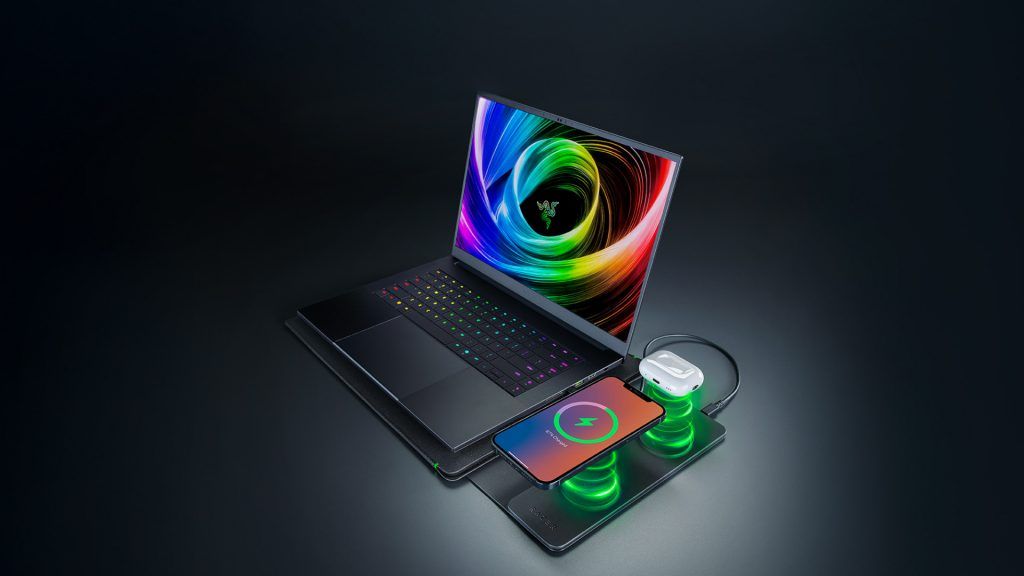
Razer Laptop Sleeve with Wireless Charging: A Game-Changer?
Imagine a laptop sleeve that doubles as a wireless charging station. Razer just launched a $130 model with dual charging pads, while the base variant costs just $80. Whether you’re a gamer, a professional, or a tech enthusiast, this product could redefine how you carry and power your devices.
What Makes the Razer Laptop Sleeve Unique?
Razer’s new sleeve isn’t just a protective case—it’s a smart accessory. The $130 version features two wireless charging pads: one for 15W and another for 5W. A USB-C cable connects the flap to your laptop, eliminating the need for separate chargers. Meanwhile, the $80 base model offers a sleek, padded design with a magnetic flap but no charging tech.
Key Features at a Glance
- 16-inch Compatibility: Fits most laptops and tablets.
- Dual Charging Pads: 15W and 5W for phones and earbuds.
- Durable Design: Reinforced stitching and a microfiber interior.
- No Battery Required: Powered via USB-C, no internal battery.
Why This Matters for Gamers and Professionals
For gamers, the sleeve’s wireless charging could keep peripherals powered during long sessions. Professionals benefit from a clutter-free workspace—no more juggling multiple chargers. The sleeve’s minimalist design also avoids Razer’s signature RGB, which might appeal to users seeking understated tech.
Pros and Cons
- Pros: Sleek design, dual charging, no battery needed.
- Cons: No RGB lighting, higher price for charging model.
Should You Buy the Razer Laptop Sleeve?
If you prioritize convenience and modern tech, the $130 model is worth it. The base $80 variant is ideal for those who want protection without extra features. Both are available now on Razer’s website. For $50 more, you gain a portable charging solution that could streamline your workflow or gaming setup.
FAQs About the Razer Laptop Sleeve
1. What is the Razer laptop sleeve?
A protective sleeve with optional wireless charging for laptops and devices.
2. Does the Razer laptop sleeve have RGB lighting?
No, it lacks RGB features, focusing on a minimalist design.
3. How does the wireless charging work?
It uses a USB-C connection to power the charging pads, no internal battery.
4. Can it fit a 16-inch laptop?
Yes, it’s designed for up to 16-inch devices.
5. Is the Razer laptop sleeve worth the price?
Depends on your needs. The $130 model adds convenience, while the $80 variant is a budget-friendly option.








