
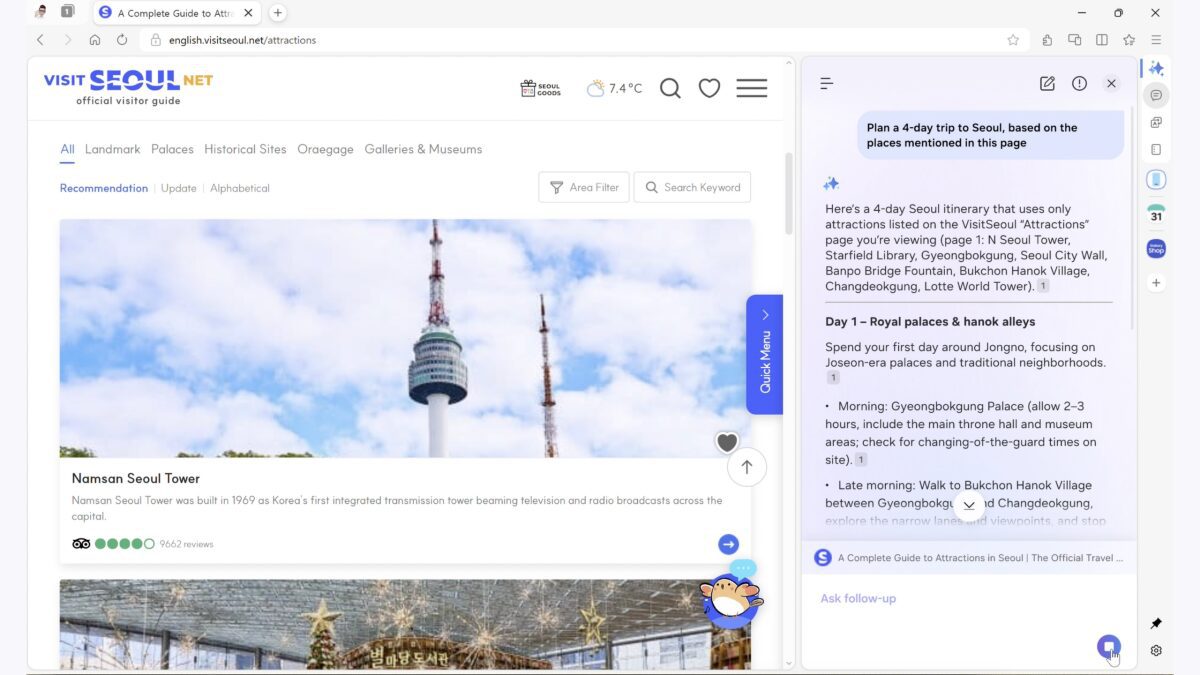
Samsung Browser for Windows Launches with Cross-Device Sync and AI
Samsung has officially expanded its ecosystem with the release of Samsung Browser for Windows, a Chromium-based browser designed to streamline cross-device workflows and integrate advanced AI features. After a six-month beta test, the browser now supports Windows 10 (version 1809+) and Windows 11, offering users a seamless experience between their smartphones and PCs.
Key Features: Cross-Device Sync and Built-In AI
The browser’s standout feature is its cross-device synchronization. Users can sign in with their Samsung account to sync bookmarks, browsing history, and open tabs across devices. This means you can start researching a product on your phone and continue on your laptop without missing a beat. Samsung Pass also extends to Windows, allowing secure access to saved passwords, payment details, and addresses.
Agentic AI: Smarter Browsing
Samsung has partnered with Perplexity to embed agentic AI into the browser. This AI can:
- Answer natural-language questions about web pages
- Summarize lengthy articles
- Search browsing history using prompts like “Show me the smartwatch I looked at last week”
- Analyze context across multiple open tabs
Initially available in the U.S. and South Korea, Samsung plans to roll out these AI features globally. The browser also includes ad-blocking, secret mode for privacy, dark mode, and extension support—making it a versatile tool for everyday users.
Why This Matters for Productivity and Security
For professionals and casual users alike, the browser’s cross-device sync reduces friction in multitasking. Imagine drafting an email on your phone during a commute and finishing it on your desktop at work—all without re-logging or re-searching. The AI-powered search function further eliminates the need to remember specific URLs or dates, streamlining workflows.
Security and Privacy Enhancements
Samsung Pass on Windows adds an extra layer of security by centralizing sensitive data. Users can autofill payment details or passwords with a single click, reducing the risk of phishing attacks. Meanwhile, secret mode ensures private browsing sessions remain isolated from your main activity.
How to Get Started
To download Samsung Browser for Windows, visit Samsung’s official site. After installation, connect your Samsung account to unlock full cross-device functionality. For AI features, ensure you’re in a supported region (U.S. or South Korea) and grant the browser access to your browsing history.
Conclusion: A Competitive Player in the Browser Market
Samsung Browser for Windows isn’t just another Chromium clone—it’s a strategic move to unify its ecosystem and offer AI-driven productivity tools. While Chrome and Edge dominate the market, Samsung’s focus on seamless device integration and privacy could attract users seeking a more connected browsing experience.
Ready to simplify your digital life? Download Samsung Browser for Windows today and explore how cross-device sync and AI can boost your efficiency.








