
SmartApeSG Remcos RAT Campaign: How Cybercriminals Exploit ClickFix CAPTCHA
Malware campaigns evolve rapidly, but one persistent threat continues to exploit vulnerable websites: the SmartApeSG Remcos RAT campaign. This operation uses a deceptive technique called ClickFix to trick users into downloading malicious software disguised as CAPTCHA verification. Let’s break down how this attack works and what you can do to protect yourself.
Understanding the SmartApeSG Threat Landscape
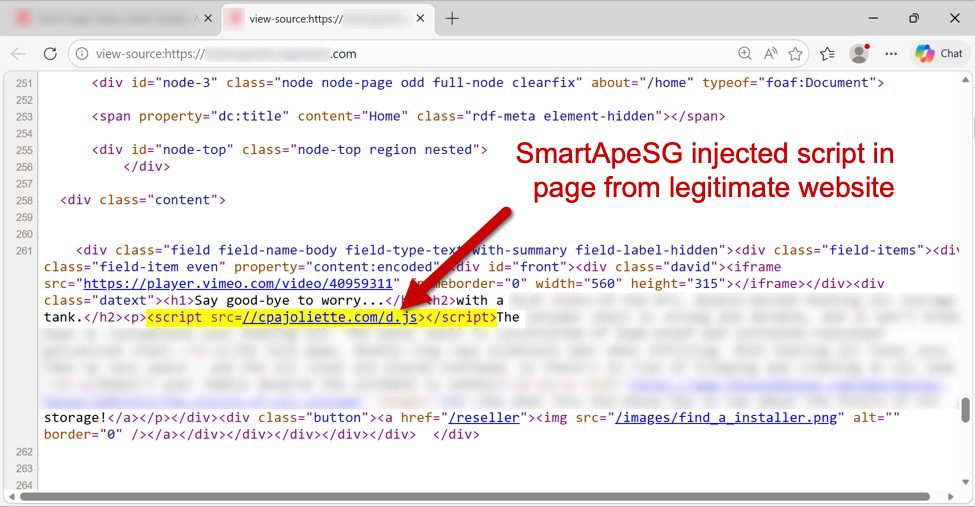
First identified in 2025, SmartApeSG has consistently delivered payloads like NetSupport Manager RAT and now Remcos RAT. The campaign’s modus operandi involves compromising legitimate websites to inject malicious scripts. These scripts generate fake CAPTCHA pages that mimic security checks, a tactic known as ClickFix.
Attackers use social engineering to trick users into executing malicious commands. For example, victims are instructed to copy a script from a fake CAPTCHA page and paste it into their system’s run window. This simple action triggers a chain of events that downloads and installs Remcos RAT.
How the SmartApeSG Infection Chain Works
Step 1: Website Compromise
Legitimate websites are injected with a script hosted at domains like cpajoliette.com/d.js. This script redirects users to a fake CAPTCHA page, often hosted on domains like retrypoti.top.
Step 2: User Interaction
Victims see a CAPTCHA-style prompt asking them to verify they’re human. After checking a box, they’re shown instructions to open a run window and paste a malicious script. This script initiates the malware download.
Step 3: Malware Delivery
The ClickFix script triggers connections to domains like forcebiturg.com, which serve a ZIP archive disguised as a PDF. This archive contains Remcos RAT, which uses DLL side-loading to execute the payload. The malware then establishes persistence via Windows Registry modifications.
Key Indicators of SmartApeSG Activity
- Injected Scripts: Look for suspicious
.jsfiles from domains likeretrypoti.toporcpajoliette.com. - Redirect Chains: Malicious traffic often includes 302 redirects to HTTPS endpoints, such as
forcebiturg.com/boot. - Malware Artifacts: Remcos RAT is typically delivered as a ZIP archive with a .pdf extension, saved in temporary directories like
C:UsersAppDataLocalTemp.
Protecting Against SmartApeSG Attacks
SmartApeSG operators frequently change domains and file hashes, making detection challenging. However, understanding their tactics can help you stay ahead:
- Verify CAPTCHA Prompts: Legitimate CAPTCHAs don’t ask you to run scripts. Always double-check the source.
- Monitor Network Traffic: Use tools like Wireshark or Fiddler to detect unusual HTTPS connections to unknown domains.
- Update Security Tools: Ensure antivirus and endpoint protection software are configured to detect DLL side-loading and registry persistence techniques.
Stay Vigilant in a Shifting Threat Landscape
The SmartApeSG campaign demonstrates how attackers adapt to evade detection. While the specific domains and file hashes change regularly, the attack pattern remains consistent. By recognizing the hallmarks of ClickFix-style CAPTCHA attacks and maintaining robust security practices, you can reduce your risk of falling victim to Remcos RAT.
Stay informed: Follow trusted cybersecurity resources like malware-traffic-analysis.net for updates on emerging threats and mitigation strategies.








