
Stream F1 on Apple TV: 2026 Guide & Features
Apple TV is revolutionizing how fans watch Formula 1 in 2026 with a dedicated F1 channel, 4K broadcasts, and innovative features like multi-view and live telemetry. Whether you’re a die-hard racing fan or new to the sport, this guide explains everything you need to know about streaming F1 on Apple TV.
What’s New in F1 Streaming on Apple TV?
Apple’s 2026 partnership with F1 brings live grand prix coverage, practice sessions, and the latest season of Drive to Survive to the Apple TV app. The F1 channel is now a hub for all race-related content, including pre- and post-race analysis. For example, you can watch the Australian Grand Prix (March 6-8) live in 4K with Dolby Vision and 5.1 audio.
Key Upgrades for 2026
- Dedicated F1 Channel: All races, practice sessions, and Drive to Survive episodes are centralized.
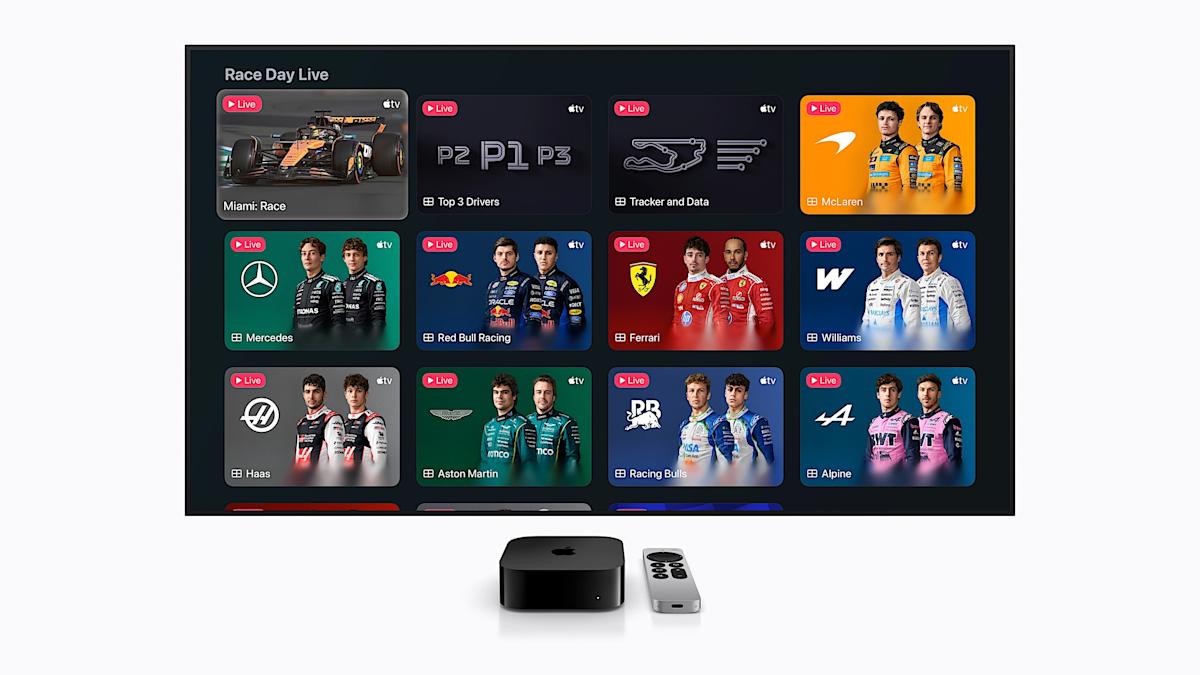
- Multi-View Options: Split-screen views let you watch the main broadcast alongside driver cameras and telemetry data.
- F1 TV Premium Access: Subscribers get onboard cameras, team radios, and live data feeds.
How to Watch F1 on Apple TV
Streaming F1 on Apple TV is straightforward. Open the Apple TV app, navigate to the F1 channel, and select your preferred broadcast. Here’s what to expect:
Step-by-Step Guide
- Open the Apple TV app and search for the F1 channel.
- Click on the current grand prix weekend for live coverage.
- Use the Follow F1 option to receive event notifications.
- Access multi-view by selecting preset layouts or customizing your screen.
Additional Features
Apple has added tools like Driver Tracker and Driver Data to enhance the experience. For example, Mercedes fans can watch Lewis Hamilton’s onboard camera while the main broadcast plays. Apple Maps also provides race-day logistics for in-person attendees.
Why Apple TV Outshines Other Platforms
Compared to traditional F1 streaming services, Apple TV offers unique advantages:
- 4K Quality: All races are broadcast in 4K with Dolby Vision.
- Multi-Screen Flexibility: Use F1 TV Premium on a second device for additional feeds.
- Condensed Replays: 30-minute race summaries for quick catch-ups.
Conclusion: Ready to Race with Apple TV
Apple TV’s 2026 F1 coverage is a game-changer for fans. With multi-view, 4K broadcasts, and seamless integration of Drive to Survive, it’s the ultimate platform for Formula 1. Don’t miss the Australian Grand Prix on March 6—grab your remote and start streaming!
FAQs
How do I stream F1 on Apple TV in 2026?
Open the Apple TV app, find the F1 channel, and select live races or Drive to Survive episodes.
Can I watch F1 in 4K on Apple TV?
Yes, all 2026 F1 races are broadcast in 4K with Dolby Vision and 5.1 audio.
What’s F1 TV Premium on Apple TV?
It adds onboard cameras, team radios, and live telemetry data to your Apple TV subscription.
Is there a multi-view option for F1 on Apple TV?
Yes, you can split your screen to watch the main broadcast with driver cameras and telemetry data.
How does Apple TV compare to Netflix for F1 coverage?
Apple TV offers live races and exclusive features like multi-view, while Netflix streams Drive to Survive and the Canadian Grand Prix in May.








