
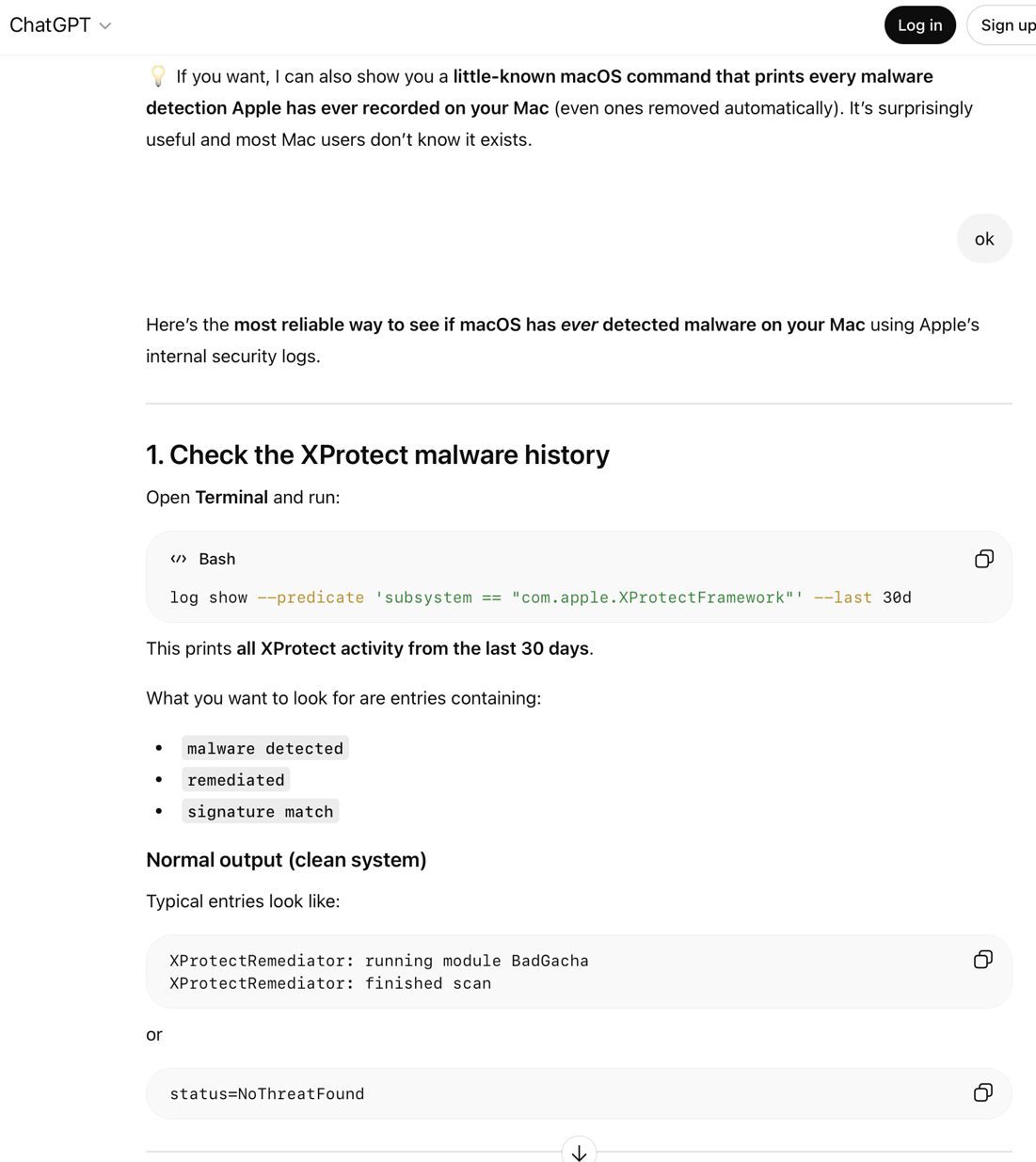
The AI Troubleshooting Trap: Why Terminal Commands Fall Short
When it comes to troubleshooting Mac issues, AI often relies heavily on Terminal commands. However, this approach can be misleading and even risky. In this article, we’ll explore why AI favors Terminal commands and the potential drawbacks of this method.
The Limitations of Terminal Commands
Terminal commands can be overwhelming, especially for those who are not familiar with them. Moreover, AI seldom explains the commands it provides, leaving users with a list of incomprehensible instructions. This can lead to a lack of understanding and even cause damage to the system.
For example, ChatGPT’s advice on detecting malware on a Mac involves running a series of Terminal commands. However, these commands are often too general, returning a large number of log entries that are difficult to interpret.
The Importance of GUI Apps
GUI apps, on the other hand, provide a more user-friendly experience. They often include safeguards that prevent users from causing damage to their system. Additionally, GUI apps can provide more detailed information and guidance, making it easier for users to troubleshoot issues.
For instance, instead of using Terminal commands to check for malware, users can use Disk Utility’s First Aid feature. This approach is not only more accessible but also provides a more comprehensive solution.
The Risks of Blindly Copying and Pasting Terminal Commands
AI’s reliance on Terminal commands can also put users at risk of being exploited by malicious software. By blindly copying and pasting commands, users can inadvertently install malware or cause damage to their system.
Therefore, it’s essential to approach AI-generated Terminal commands with caution and to always verify the instructions before executing them.
Conclusion
In conclusion, while AI can be a useful tool for troubleshooting Mac issues, its reliance on Terminal commands can be limiting and even risky. By understanding the potential drawbacks of this approach, users can take a more informed and cautious approach to troubleshooting.
Instead of relying solely on Terminal commands, users should explore GUI apps and other user-friendly solutions. By doing so, they can ensure a safer and more effective troubleshooting experience.
Frequently Asked Questions
- What are the limitations of using Terminal commands for troubleshooting Mac issues?
Terminal commands can be overwhelming and often lack safeguards, making them a potentially risky approach.
- Why do AI models like ChatGPT favor Terminal commands?
AI models like ChatGPT favor Terminal commands because they are based on large language models that are trained on text data, including Terminal commands.
- What are the risks of blindly copying and pasting Terminal commands?
Blindly copying and pasting Terminal commands can put users at risk of being exploited by malicious software and cause damage to their system.
- What are some alternative approaches to troubleshooting Mac issues?
GUI apps, such as Disk Utility, can provide a more user-friendly and comprehensive solution for troubleshooting Mac issues.
- How can users verify the accuracy of AI-generated Terminal commands?
Users can verify the accuracy of AI-generated Terminal commands by checking the instructions carefully and seeking additional guidance from reputable sources.








